Onboard a payer, sponsor, or TPA from the file they already have. Map their columns once, teach the fields how to clean themselves, and turn a raw HR export into standards-clean X12 — no re-keying, no custom code per client.
What It Does
A mapping studio for messy real-world data.
Every client sends a different layout with its own quirks. Instead of a one-off importer for each one, operators build a reusable configuration in a visual studio — and the same engine backs it in every HIPAAsuite master.
Enrollment Master 5.0
Visual field mapping
Drag a spreadsheet column onto the database field it feeds. Rename on the fly; the field keeps its real column name underneath so validation and the write always line up
A configuration per client
Each layout is a self-contained folder — mappings, defaults, and its own transform scripts together. Pick a client from the dropdown and the whole setup loads. No cross-contamination.
Configs/<Client>/
Fields that clean themselves
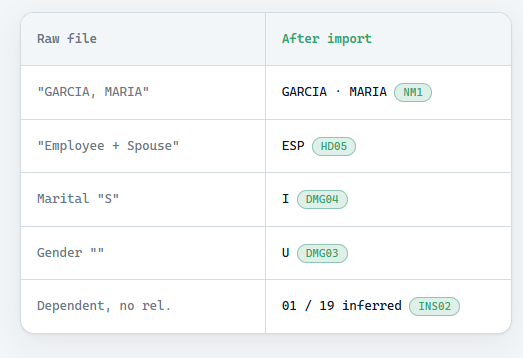
Attach a small C# rule to any column — fill a blank gender, translate a marital code, derive coverage level, split a full name — in a syntax-highlighted editor. File-level scripts add whole calculated columns.
value ⇒ transformed
Constants & defaults
Right-click any field to pin a file-wide constant — sponsor ID, payer, qualifiers — so operators never paste the same value down 7,000 rows.
Always matches your database
The mapping tree is built from the live table schema, so it can never drift out of date — and it flags immediately if a deployed database is missing a column.
Validated before it lands
Required, type, and length checks run on every cell, plus X12 code-set enforcement (gender, marital status, benefit status) — so what you generate is compliant, not just complete.
The workflow
Four steps from file to filing.
01
Point at the file
Pick the client's Excel or CSV. Its columns load straight into the mapping grid.
02
Map & transform
Connect columns to fields, set constants, and add clean-up rules where the data needs help.
03
Validate
Run the import with checks on. Every failed row is flagged with a plain-English reason.
04
Generate compliant EDI
Records land in the database and flow into a standards-clean transaction — ready to check and send.
Proof point
A raw HR export filed clean.
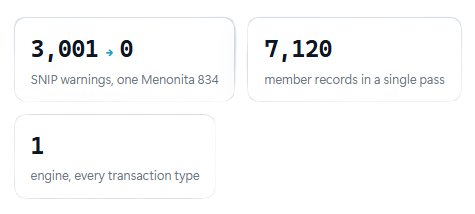
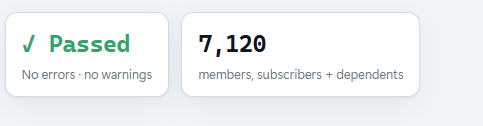
A Menonita Oracle-HR extract came in as a flat CSV: full names in one cell, coverage described in prose, blank genders, a marital code that didn't match X12. Mapped once with a handful of field rules, it produced a fully SNIP-validated 834 covering every member — no manual fixes.
One engine, every transaction
Built once, shared across the suite.
The import studio lives in the shared platform layer, so every HIPAAsuite master inherits the same mapping, scripting, and validation — no per-product rebuild.