Your data, your columns, your order.

An 820 arrives as EDI. It lands in your database. From there it leaves as whatever the reader actually needs — a workbook, delimited text, nested XML or JSON, or a fresh compliant EDI file. The Data Exporter owns that last step: you choose which columns go out, what they are called, and what order they appear in.

HIPAAsuite Premium Payment Master

Output formats

      6

File types

 xlsx · csv · xml ·                 Json

Column order

Drag & drop

Saved setups

Unlimited

The dataflow

EDI in. Your database in the middle. Anything out.

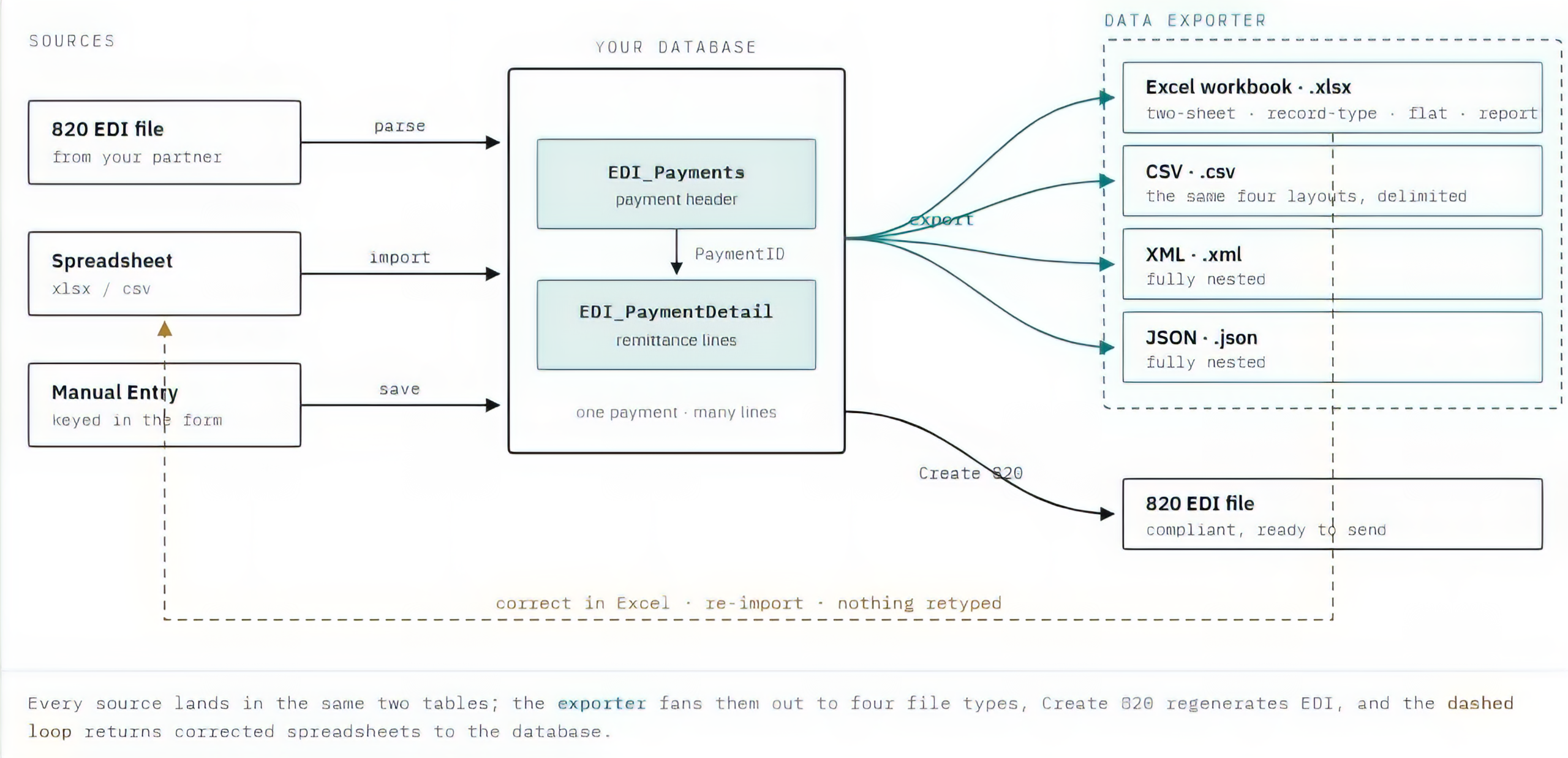
The 820 arrives as an EDI file and is parsed into your own tables — the same tables you can query, correct and report on. What leaves the other side is no longer constrained by EDI. One store, many destinations, and a loop back for the corrections.

The data stops being trapped

An 820 is a wire format, not a working format. Once parsed, the same records answer to Excel, to a finance system, to an API — without anyone reading a segment.

One store, one truth

EDI files, spreadsheet loads and hand-keyed payments all land in the same two tables, so every format downstream is describing the same records.

The loop closes

Send a workbook out for correction and load the corrected file straight back in — then regenerate a compliant 820 from it. Nothing is retyped.

The window

One screen, top to bottom

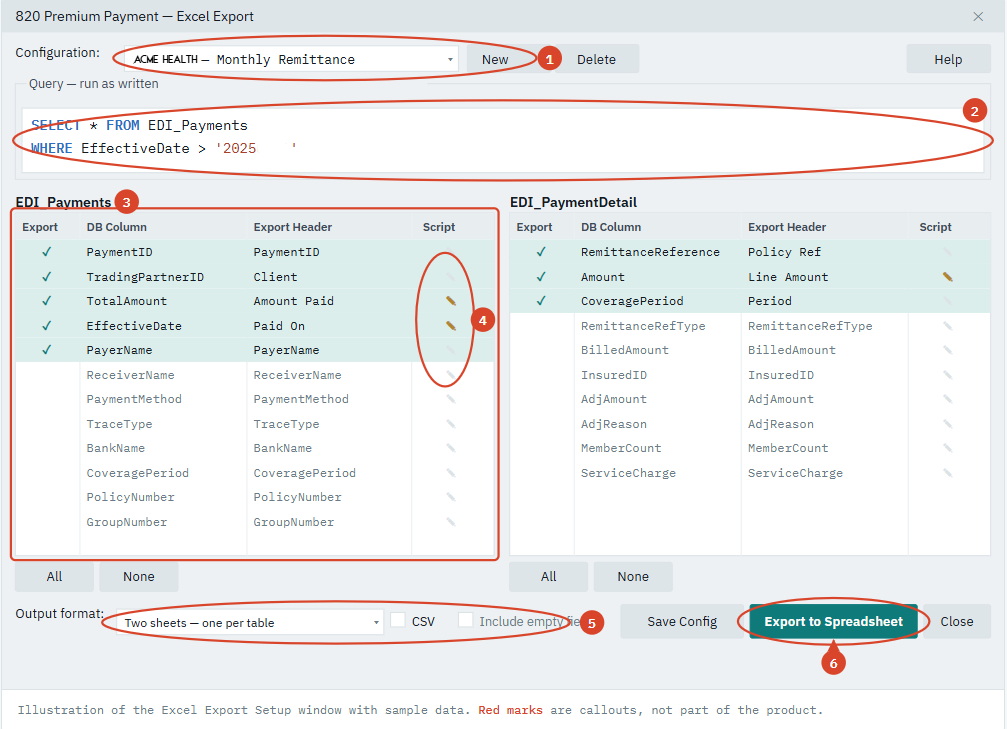
Open Data Base → Excel Export Setup. The form reads your live table layout, so the columns you see are the columns you actually have — nothing is hard-coded.

1. Named configurations

Pick a saved setup or create one with New. Delete removes it.

2. Query box

Colour-coded SQL, run exactly as written. Defaults to SELECT *.

3. Column grids

One per table — payment header and remittance detail.

4. Script column

A filled quill means that column has a transform; grey means none.

5. Output format

Six shapes, plus a CSV switch and empty-field handling.

6. Export

Choose a file name; the file is written and the row count reported.

Column ordering

Drag a column. The file follows.

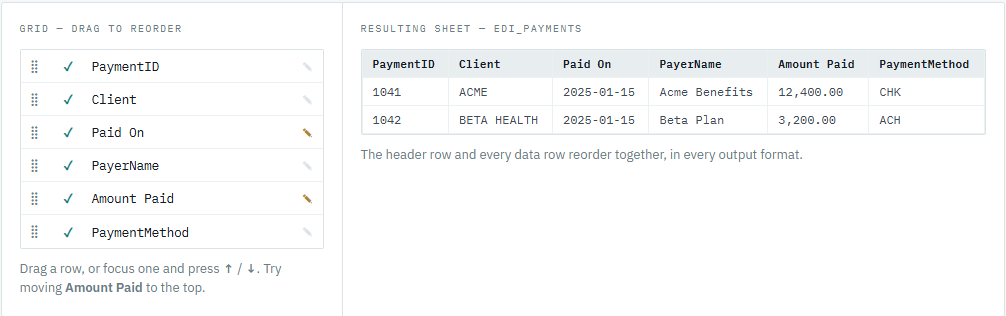
Columns come out of the database in whatever order the table happens to define. That is rarely the order a client wants to read. Drag any row to move it — the export follows the order on screen, and the order is saved with the configuration.

Output formats

Six shapes for the same records

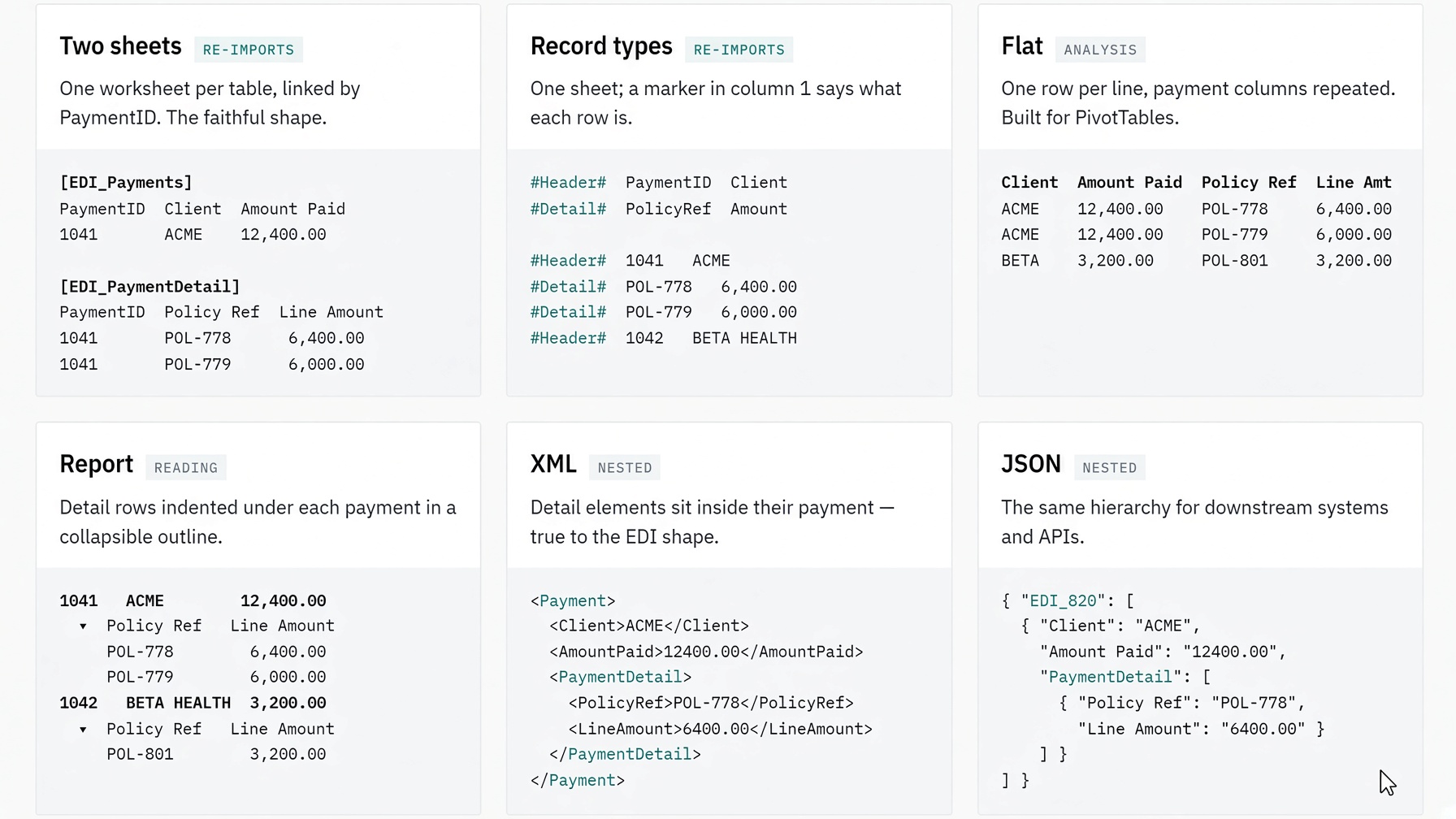
A payment is a parent with many remittance lines. Flat files can only fake that; some of these keep the hierarchy intact, some flatten it for analysis. Pick per configuration.

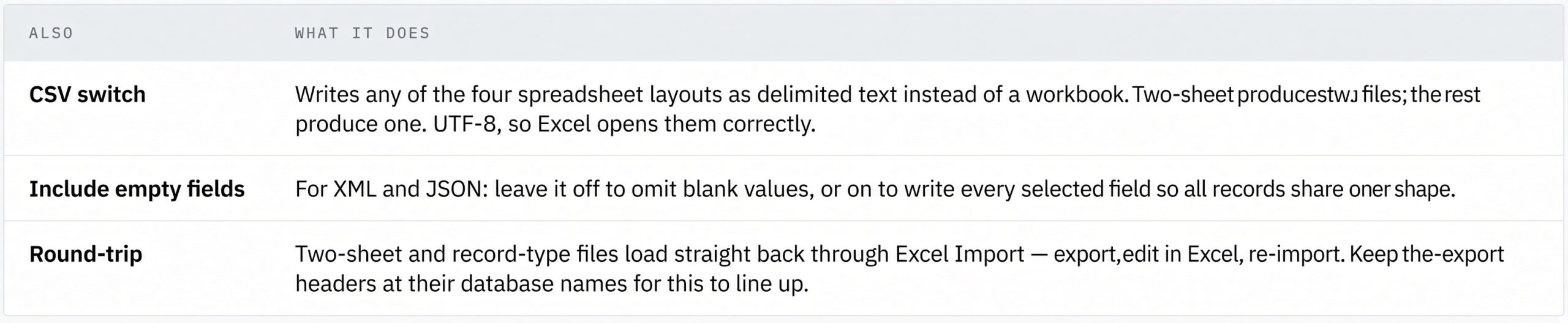
Also and what they do:

CSV switch

Writes any of the four spreadsheet layouts as delimited text instead of a workbook. Two-sheet produces two files; the rest produce one. UTF-8, so Excel opens them correctly.

Include empty fields

For XML and JSON: leave it off to omit blank values, or on to write every selected field so all records share one shape.

Round-trip

Two-sheet and record-type files load straight back through Excel Import — export, edit in Excel, re-import. Keep the export headers at their database names for this to line up.

Per-column transforms

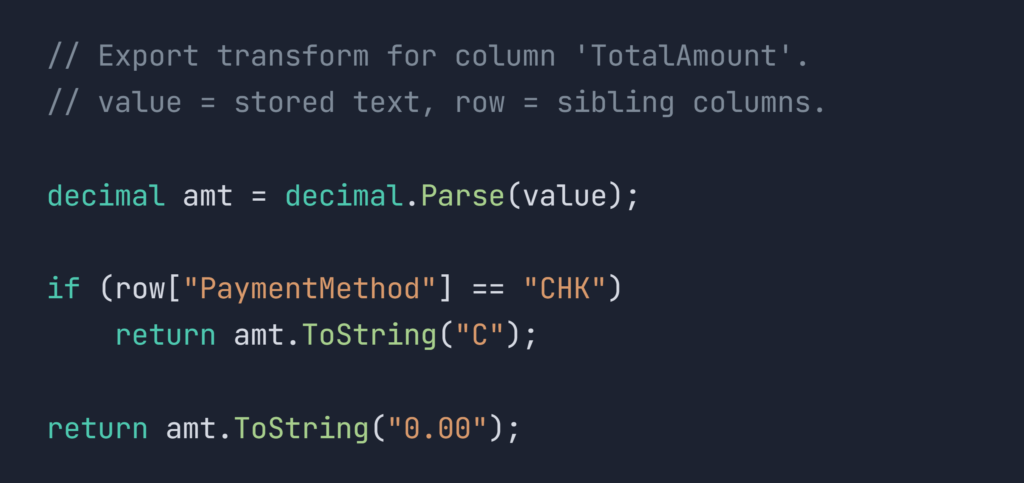
When a value has to leave differently than it is stored.

Click the quill on any column to attach a small C# script. It receives the stored value and row — the rest of that record — and returns the text to write. Nothing else changes: the column keeps its name, its position, and its place in every format.

Filled quill

The column carries a transform.

Grey quill

No transform — the value goes out as stored.

Saved with the setup

Scripts belong to the configuration, so different clients can format the same column differently.

Every feature

The complete list

Reads your live tables

The grids are built from the database layout at the moment you open the form. Add a column to the table and it shows up — no rebuild, no hard-coded field list.

Pick your columns

Tick the columns to send. A fresh setup starts with nothing ticked, so what goes out is always deliberate. All / None per grid.

Rename headers

Type the heading the client should see. “TradingPartnerID” leaves as “Client” without touching the database.

.

Reorder by dragging

Drag rows into the order you want them read. The order carries into every format and is saved with the configuration.

Per-column transforms

Attach a C# script to any column to reformat, combine or mask its value on the way out.

.

Query run as written

The query box is a color-coded SQL editor, and what you type is what runs. Filter by date, by trading partner, by anything you can express — including joins.

Header and detail together

Detail lines are matched to their payments automatically by PaymentID — you never write the join.

Six output shapes

Two-sheet, record-type, flat, report, nested XML, nested JSON — from the same column setup.

Four file types

xlsx, csv, xml and Json, chosen by the format and the CSV switch.

Named configurations

Save the entire arrangement under a name and switch between clients from the drop-down. New, Save Config and Delete manage the list.

Round-trip with Import

Two formats reload through Excel Import, so a spreadsheet can go out for correction and come back in.

.

Help on the form
 
A Help button and F1 open the topic for this window.
 

Any database

Queries run as written and results are read by column name — nothing is bound to one database engine.

Built to spread

The exporter is a shared component. Bringing it to another HIPAAsuite transaction takes a handful of lines, not another form.

.

What a configuration remembers

One name. Everything in it.

The import studio lives in the shared platform layer, so every HIPAAsuite master inherits the same mapping, scripting, and validation — no per-product rebuild.

Columns
Which are ticked, in both grids
Format
Layout, CSV switch, empty-field handling
Query
The SQL in the query box
Headers
Every rename you typed
Order
The exact row order you dragged
Scripts
Every per-column transform

.

.

Data Exporter · Data Base → Excel Export Setup.

HIPAAsuite Premium Payment Master

Your data, your columns, your order.

EDI in. Your database in the middle. Anything out.

HIPAAsuite Premium Payment Master — Data Exporter · Data Base → Excel Export Setup.

Smaller payers are priced out of accurate adjudication.

HIPAAsuite Adjudication