About EDI Exchange |
  
|
About EDI Exchange |
|
EDI Exchange is an EDI pre-processor that handles FTP transport, encryption, HIPAA compliance checks and control of transactions, Trading Partner management, and file management. It is designed for organizations with a large volume of EDI files who need more order and automation, and to adhere to stricter compliance rules.
EDI Exchange is a module built into HIPAAsuite applications, but is licensed separately. HIPAAsuite products with the EDI Exchange module have a main menu tab called "EDI Exchange" with sub-menus to call the module's functions. See the example below:
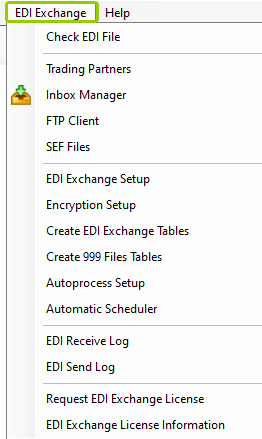
Sample of the "EDI Exchange" tab.
EDI Exchange has the following features:
EDI Exchange makes it easy to store and manage Trading Partners' information. See the parameters you can store for Trading Partners:
oBasic contact information (name, phone, and address)
oEDI Identifiers
oDelivery methods
oEncryption parameters
oFTP/SFTP connections
oCORE-compliant server addresses and credentials
oFolder distribution for efficient file storage
See Setting Up Trading Partners for more details.
EDI Exchange has a built-in file transfer protocol (FTP) client that securely connects to your Trading Partner's FTP servers. If you employ your own FTP server, you can utilize the folder structure that EDI Exchange uses to manage incoming files, users, home directories, and permissions so that your Trading Partners can drop off and pick up EDI files. The supported FTPs are:
oSimple FTP
oFTP Secure
§Implicit FTPS
§Explicit FTPS
oSecure Shell FTP or SFTP
See Using Built-in FTP Client for more details.
Many healthcare-related companies use encryption to cloak the content of their EDI files. The prevalent encryption method is PKI (Private Key Infrastructure), which employs the product of two large prime numbers as a cipher. EDI Exchange supports PGP (Pretty Good Privacy), the leader in PKI products as well as the open source GPG project with its Windows sub-project, GPG4Win. Both are implementations of the same encryption mechanism. Read more in Setting Up Encryption.
EDI Exchange uses a clear directory structure to store EDI files. The structure is based on root directories for incoming files, outgoing files, processed files, and suspended files. Below these root directories are sub-directories for each Trading Partner and each transaction set. Read more in Defining Communications Directory and Initializing EDI Exchange.
EDI standards are strict and precise; adherence to them is important so that any organization can work with them regardless of their back-end system software. EDI Exchange has a built-in compliance engine that checks incoming files and generates a report listing each problem with the exact location. Outgoing EDI files can also be checked and you have an option to withhold individual records that violate the rules. Read more in Checking EDI Files.
EDI protocols have a few supporting transaction sets that are useful for the smooth functioning of EDI exchanges. They provide the sender with instant feedback on receipt. The following transaction sets are available:
oTA1 Acknowledgment
o997/999 Functional Acknowledgment
o277U/277CA Unsolicited Claim Status Response (in case of Claims)
EDI Exchange has several logs that are instrumental to keep processing in order and allow users to investigate mishaps. There are three logs in EDI Exchange:
oIncoming file log
oOutgoing file log
oDaily transaction log
See Accessing EDI Logs.