|
<< Click to Display Table of Contents >> Member Search Option Setup |
  
|
|
<< Click to Display Table of Contents >> Member Search Option Setup |
|
HIPAA Eligibility Responder has an implemented hierarchy in which it conducts its member searches. (How is this order established? Can you edit this? How and where?) The hierarchy is divided into two options: the type of search and the information to be searched.
1.Select Setup > Database Archiving Setup in the main menu window.
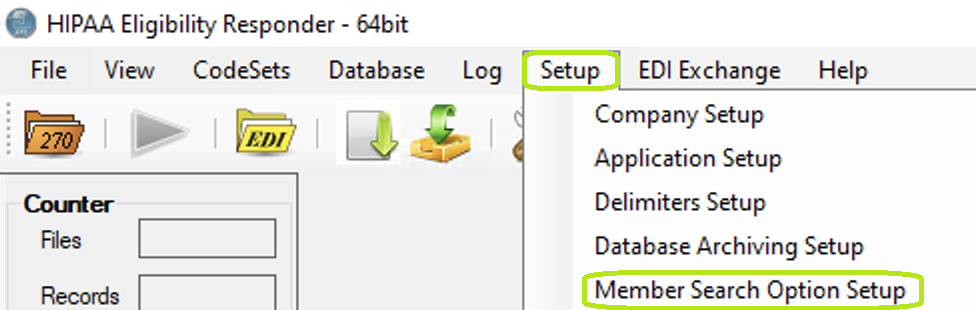
The "Setup" menu and "Member Search Option Setup" button.
The following window will open:
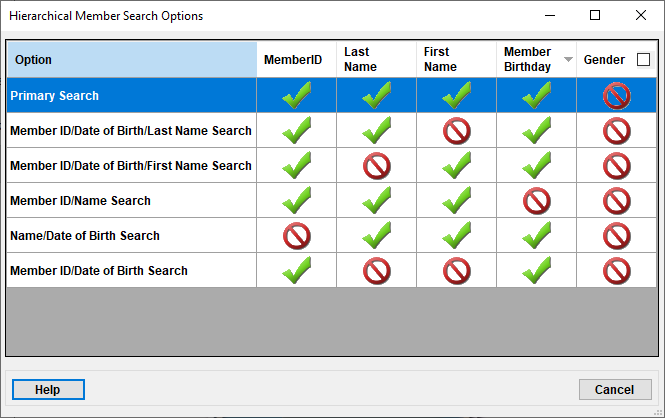
The "Hierarchical Member Search Options" window.
The green check marks denote the parameters that are clear to be searched. The red no symbol denotes the parameters are not clear to be searched.
You can determine if "Gender" is to be included in the search or not by checking the bock above the "Gender" column.