Accessing Inbox Manager |
  
|
Accessing Inbox Manager |
|
Inbox Manager allows the download of EDI files into the "Inbox" folder. This window manages the post-processing of the EDI files, compliance checking, and auto-processing options.
To access the Inbox Manager, go to EDI Exchange > Inbox Manager in the main menu window.
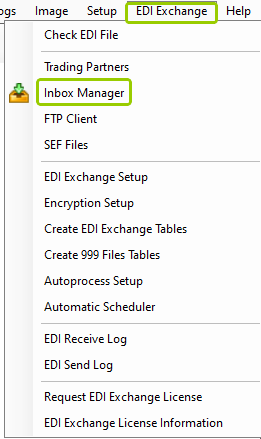
The "Inbox Manager" option is under the "EDI Exchange" tab.
Alternatively, click the "Process Inbox" icon in the Taskbar.

The "Process Inbox" icon is in the Taskbar.
With either option, the following window will open:
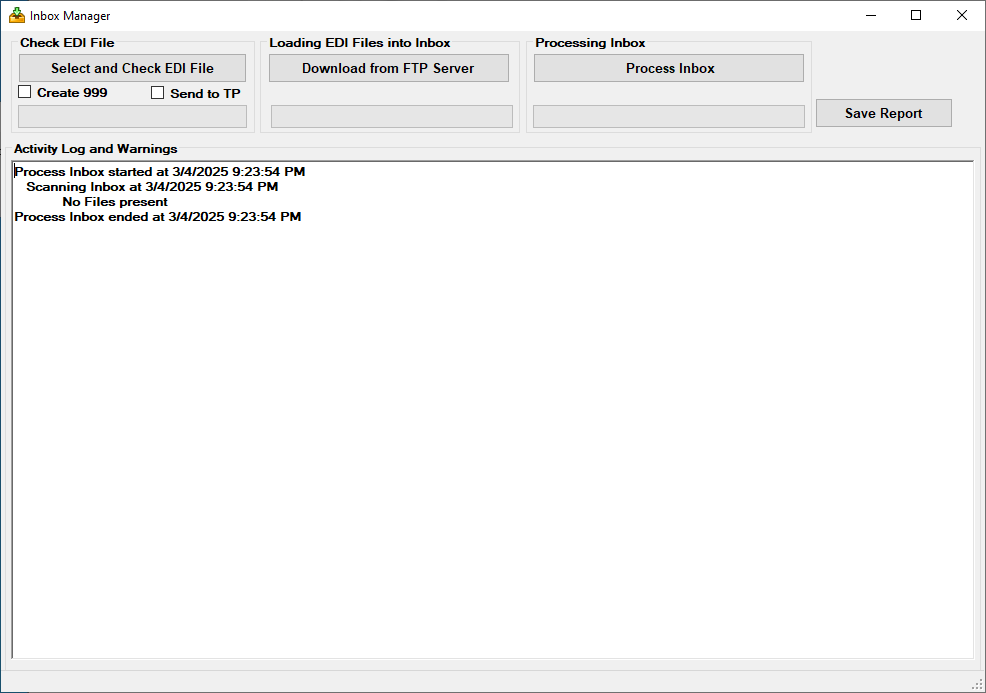
There are four sections in the "Inbox Manager" window:
oCheck EDI File
oLoading EDI Files into Inbox
oProcessing Inbox
oActivity Log and Warnings
Through the following sub-topics, we will explore each function in detail. Follow the shortcuts below for each sub-topic:
oSelecting and Checking EDI Files