|
<< Click to Display Table of Contents >> Edit Mode Setup |
  
|
|
<< Click to Display Table of Contents >> Edit Mode Setup |
|
1.To configure the application, go to Setup > Edit Mode Setup in the main menu window.
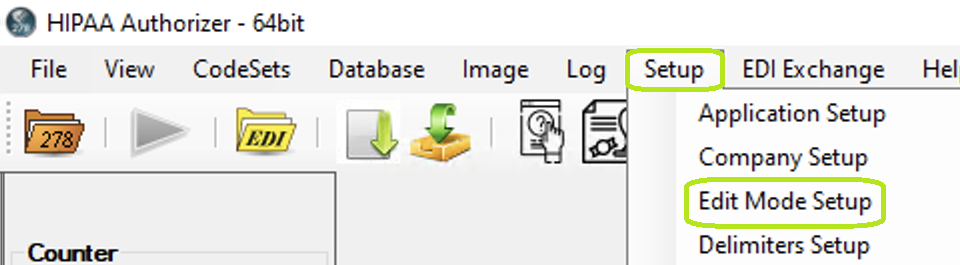
The "Setup" menu and Edit Mode Setup" button.
2.When you click on "Edit Mode Setup," the following screen comes up:
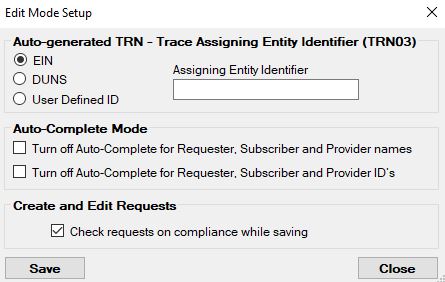
The "Edit Mode Setup" screen.
The first element is the Entity identifier that is used in the TRN_03 element. Since it will be the same for all requests, it can be set here.

Auto-generated TRN - Trace Assigning Entity Identifier (TRN03) section.
Next comes the auto complete behavior. If you save requesters, subscribers and providers, they will be available for auto-complete action unless you select here not to have the auto complete feature.

Auto-Complete Mode section.
Last is the option to check the requests for HIPAA EDI compliance. We feel that this is very important when creating request records that will be sent to another trading partner.

Create and Edit Authorization Authorization Requests section.