|
<< Click to Display Table of Contents >> Company Setup |
  
|
|
<< Click to Display Table of Contents >> Company Setup |
|
Creating EDI files will include a lot of information on you and your trading partners. The company setup screen is designed to enter all the necessary information for the EDI creation. When you create EDI files there are a few elements needed to identify your company as the sender, the producer of this EDI file. For this matter, use the company setup screen. You can specify your company information and other setting related to your company there.
If you have the EDI Exchange component licensed then all this information is stored in the data file "COMPANY_SETUP." If you don't have this component then this information is stored in the Windows registry.
Note: You need to configure the database first. See Setting up Database Connection.
1.To configure the company, go to Setup > Company Setup in the main menu window.
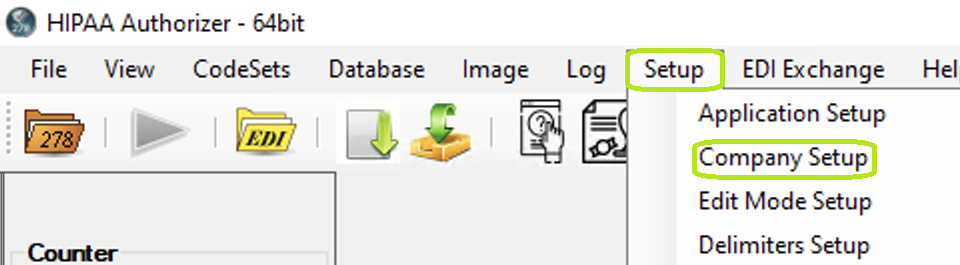
The "Setup" menu and "Company Setup" button.
2.When you click on "Company Setup," the following screen comes up:
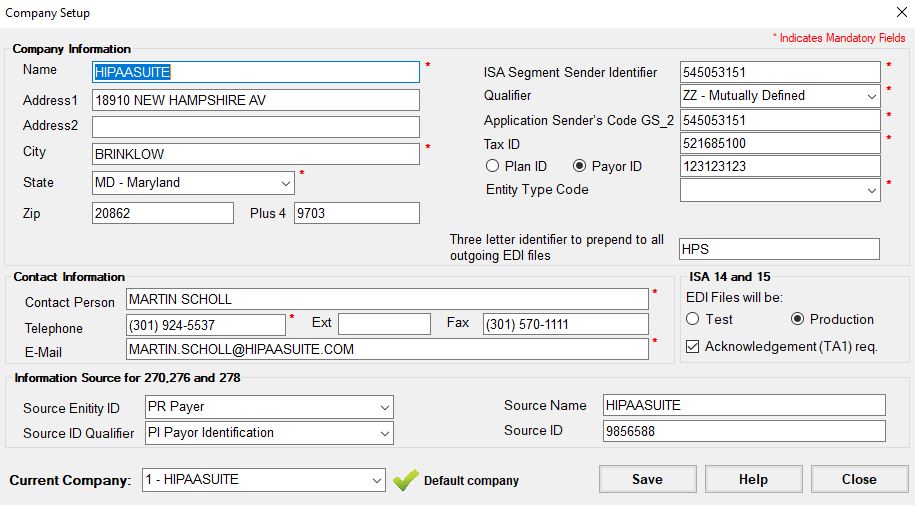
The "Company Setup" window.
3.You can configure the following options:
•Company Information
•Contact Information
•ISA 14 and 15
•Current Company
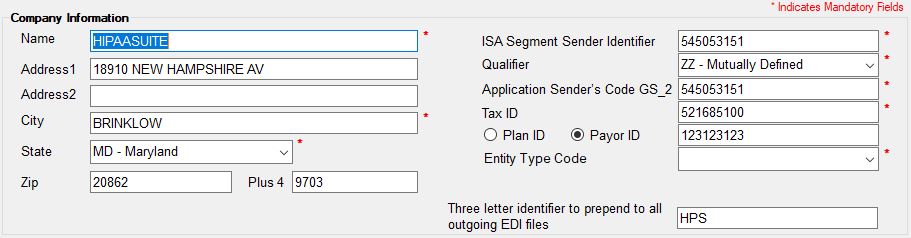
"Company Information" section.
•Name — Company name. Mandatory Field.
•Address 1
•Address 2
•City — Mandatory Field.
•State — Mandatory Field.
•ZIP
•Plus 4
•ISA Segment Sender Identification (ISA 06) — The most important field as it identifies your company for all EDI transactions. Most commonly the Qualifier "ZZ" and a free form ID up to 15 character in length is chosen. Other options include your tax ID and the Dun & Bradstreet ID.
•Qualifier — The ISA Identifier and qualifier are the unique key to the trading partner database file. The ISA identifier can be up to 15 bytes long, the qualifier has to be 2 bytes. Approved qualifiers are:
•01 — Duns (Dun & Bradstreet)
•14 — Duns Plus Suffix
•20 — Health Industry Number (HIN)
•27 — Carrier ID Number (Identification Number as assigned by HCFA)
•28 — Fiscal Intermediary ID Number (Identification Number as assigned by HCFA)
•29 — Medicare Provider and Supplier ID Number (Identification Number as assigned by HCFA)
•30 — U.S. Federal Tax ID Number (Identification Number)
•33 — NAIC Company Code (National Association of Insurance Commissioners Company Code)
•ZZ — Mutually Defined
•Application Sender's Code GS_02 — This value identifies the program or system that generated the EDI file. It is most often the same as the ISA Segment Sender ID (ISA 06), though you may specify a different ID if needed. While GS_02 usually matches ISA 06, it can represent any identifier for the application or system that created the file.
•Tax ID — Mandatory Field. Also called an Employer Identification Number (EIN).
•Plan ID / Payer ID — Fill in your Payer ID and Plan ID if you have one; this is only important for the 271 and 277 transactions. .
•Three letter identifier to prepend to all outgoing EDI files — Makes your files easily identifiable.

"Contact Information" section.
The contact information goes into the PER segment of outgoing transactions:
•Contact Person
•Telephone
•Ext
•Fax
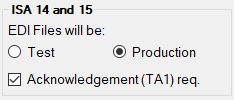
"ISA 14 and 15" section
•EDI files will be — ISA 14 determines if the resultant file contains test or production data:
•Test
•Production
•Acknowledgment (TA1) requested. — ISA 15 indicates whether you want a TA1 acknowledgment for files that you send out.

"Information Source for 270.276 and 278" section.
The information required for this section is:
•Source Entity ID
•Source Name
•Source ID Qualifier
•Source ID

"Current Company" section.
4.Once you have finished editing the options, click "Save."